The easiest and fastest way to transfer the extracted iPhone Media folder is by using a USB cable: simply connect your phone to your PC/Mac and you should be able to copy over the entire folder.
However, it's possible your PC/Mac may have issues moving many small files (like images).
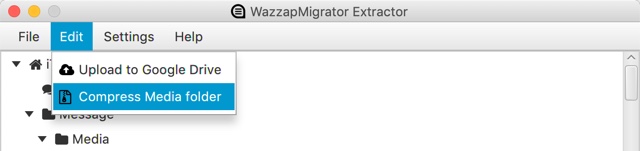
To fix this, please create a single Media.zip archive containing the entire Media folder, then transfer it to your Android phone in the Download folder. WazzapMigrator will detect and extract the Media.zip file. Please note: this Media.zip file can be created automatically by WazzapMigrator Extractor itself.
Was this article helpful?
That’s Great!
Thank you for your feedback
Sorry! We couldn't be helpful
Thank you for your feedback
Feedback sent
We appreciate your effort and will try to fix the article